Weekly Off Master
Why should I use this form?
This form helps in managing weekly-off details. Weekly-off is defined as the days in the week, which will be considered as the weekly-off.
Use this form in accordance with your corporate policies.
What are the Pre-requisites?
Data should be available in Calendar Master.
Who can access this form?
This form shall be visible to all employees to whom the visibility is given in Product Setup ® Module Role Mapping/Module Administration.
How to navigate to this form?
Point to Admin menu, select Weekly Off Master under Attendance Setup.
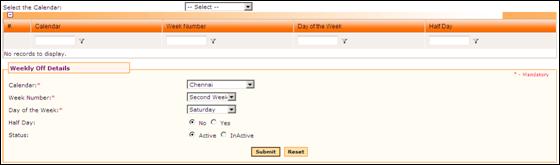
1. Select Calendar from the drop-down list. All the Active Calendars will be listed in the drop-down.
2. Select Week Number from the drop down.
· First Week – first week of a month
· Second week – second week of a month
· Third week – third week of a month
· Fourth week – fourth week of a month
· All – represents selected day in all the weeks.
3. Select Day of the Week that needs to be marked as a weekly-off day. For example, if ‘Saturday’ is selected here and the Week Number is selected as ‘Second Week’, this means that second week’s Saturday will be a weekly-off day.
4. Select whether Half day is required or not.
Click [Submit] to save the details.
Click [Reset] to refresh the form.
Post Activity
To modify any record, select the record from the grid. Selected Weekly-off will be populated in the form. Make necessary changes and click [Submit] to save the changes.
Note: If the use of a weekly-off is being discontinued then change the status to Inactive. Take care to remap employees belonging to the in-active weekly-offs in the employment record.