Post Training Feedback
Why should I use this form?
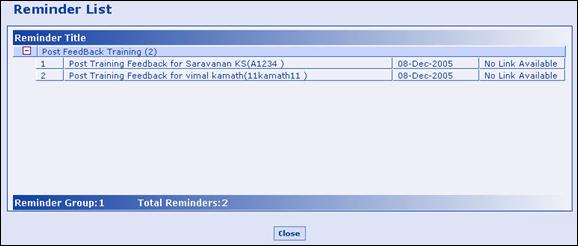
Use this form to provide feedback about your subordinates/employees who have attended the training course, after the training is completed. This list appears for the Manager as a reminder, which was set by the Training Manager when scheduling the course.
The Post Training Feedback reminder list appears as a result of the settings in the Course Schedule form for Post Training Feedback configuration. In that form the Training Manager will choose the Post Training Feedback period from a list or enter days after which the Post Training Feedback has to be provided by the Manager. Before this date reminder pops up when the manager logs in to the system with the list of Post Training Feedback which he/she has to complete. Refer to Course Schedule form for details.
What are the Pre-requisites?
Training completion.
Who can access this form?
This form shall be visible to all employees to whom the visibility is given in Product Setup à Module Role Mapping/Module Administration.
How to navigate to this form?
Point to Self Task menu, select Post Training Feedback from Training.
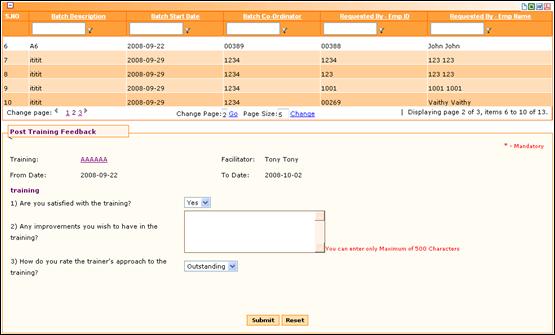
5. Click on a record from the grid. Template mapped for Post training in the Course Schedule Form for this course will be displayed.
6. Provide information as requested in the Template and click [Submit]. The information is recorded in the Adrenalin Database. This can be viewed later through Reports.
7. Clicking [Reset] will refresh the form.