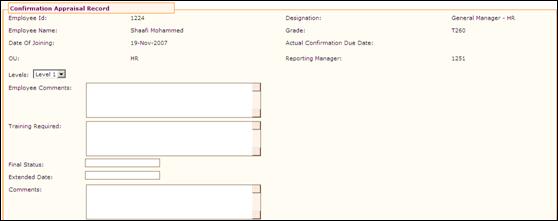
Confirmation Appraisal Record
Why should I use this form?
Employees can view their own confirmation appraisal details using this form. If a HRFAC logs into the system, apart from viewing his/her own confirmation appraisal details, he/she can view the confirmation appraisal details of employees under his/her facilitation.
The employee (L0) will be able to view the Ratings, comments and final comments given by his/her reporting manager (L1), and/or the comments made by the manager (L2) of the reporting manager, by selecting the level from ‘Levels’ drop down field. Refer the image below.
Note: The display of levels in this drop down field is based on the configuration settings. Use the Adrenalin Configuration Editor form under Admin à Product Setup to set the levels. (parameter name – ‘conf_level’)
What are the Pre-requisites?
N/A
Who can access this form?
This form shall be visible to all employees to whom the visibility is given in Product Setup à Module Role Mapping/Module Administration.
How to navigate to this form?
Point to Employment Details menu, select Confirmation Appraisal Record from Current Employment.
This form also displays records that are provided in Performance Management System.
The field guidelines are as follows:
Field Name |
Description |
Employee Comments |
Comments that are given by the employee during confirmation appraisal process is shown here |
Training Required |
Training needs identified by the appraiser is shown here. |
Final Status |
It shows the final status of the confirmation appraisal for the employee |
Extended Date |
If the confirmation is extended for the employee, then this field shows the date when the confirmation is due. |
Comments |
Shows the comments given by the appraiser. |