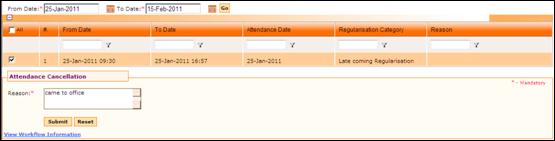
Attendance Cancellation
Why should I use this form?
Use this form to cancel attendance that has been approved. For example, an employee has raised attendance regularization anticipating a tour on duty. If in case the tour program is cancelled or postponed, then the employee can cancel the attendance regularization that he/she has raised.
What are the Pre-requisites?
Approved Attendance Regularization should be available.
Who can access this form?
This form shall be visible to all employees to whom the visibility is given in Product Setup ® Module Role Mapping/Module Administration.
How to navigate to this form?
Point to Self Task menu, select Attendance Cancellation under Attendance.
1. Select From Date and To Date, to view list of attendance regularizations and permission requests raised within that date range.
2. Clicking [Go] will populate the list of attendance regularizations and permission requests.
3. Select the record which needs to be cancelled, by clicking the check box.
4. Enter Reason for cancelling the selected attendance regularization.
5. Click [Submit] to submit the form for approval.
6. Click [Reset] to refresh the form.
Post Activity
On approval, the regularization details will be reverted back. The AR entry in the Attendance Register will be deleted.