CTC History
Why should I use this form?
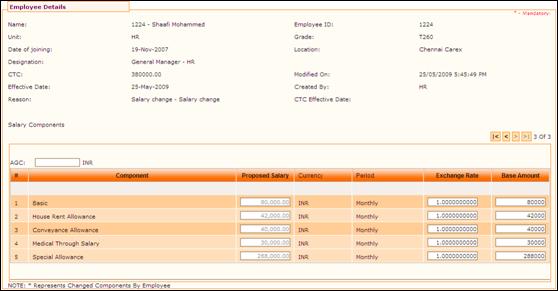
Use this form to view the CTC history details. Whenever there is a change in the CTC, history record is available in this form.
What are the Pre-requisites?
N/A
Who can access this form?
This form shall be visible to all employees to whom the visibility is given in Product Setup à Module Role Mapping/Module Administration.
How to navigate to this form?
Point to Personal menu, select Compensation History from Remuneration.
The current CTC of the employee is shown in this form by default. To view the previous CTC history details, use the navigation buttons to move first/last/next/previous records.
·  -
Click here to go to the first record in the history details.
-
Click here to go to the first record in the history details.
·  -
Click here to go to the next record in the history details.
-
Click here to go to the next record in the history details.
·  -
Click here to go to the previous record in the history details.
-
Click here to go to the previous record in the history details.
·  -
Click here to go to the last record in the history details.
-
Click here to go to the last record in the history details.
·  -
This indicates there are totally 7 records in the CTC history, and currently
the system shows the 7th record.
-
This indicates there are totally 7 records in the CTC history, and currently
the system shows the 7th record.