2.9 Change Request Approval
Only approvers who have been configured in the workflow manager will be able to approve the change requests that are raised by the initiator. In general, the shift change requests are approved by the reporting manager of the employee.
To approve shift change request,
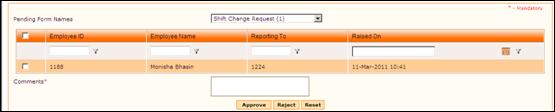
Select ‘Forms Pending for your Approval’ from “Workflow forms”. Select ‘Shift Change Request’ from this list. On selecting the form name, the list of requests that are awaiting approval will be shown as below:
Figure 14 Forms Pending for Approval
Change Requests can be approved either by directly selecting the checkbox and clicking [Approve] or by viewing details and then approving. To view details of the Change request, click a record. The Dynamic Approval form is shown, with selected Shift Change Request.
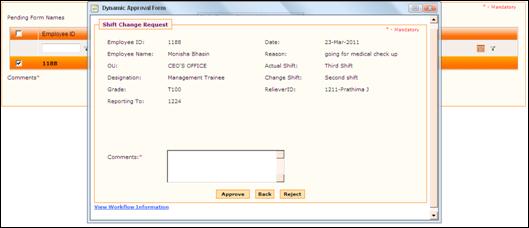
Figure 2‑12 Shift Change Request details
Enter Comments and click [Approve] to approve the regularization.
Click [Reject] to reject the request.
Once approved, the details are updated and reflected in employee view form.