Record Resignation Approval
Only the approvers who have been configured in the workflow manager will be able to approve the resignations that are raised by the initiator.
In general, the resignations are approved by the HRFAC of the employee.
To approve resignation form,
Select ‘Forms Pending for your Approval’ from the Workflow forms popup window, and select ‘Record Resignation’ from the Pending Forms List.
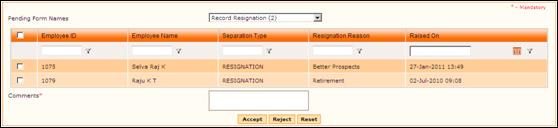
On selecting the form name, the list of requests that are waiting for approval will be shown as below:
Figure 2‑4 Forms Pending for Approval
Record Resignation can be approved either by directly selecting the checkbox and clicking [Approve] or by viewing details and then approving. To view details of the record resignation, click a record. The resignation details will be displayed as shown here:
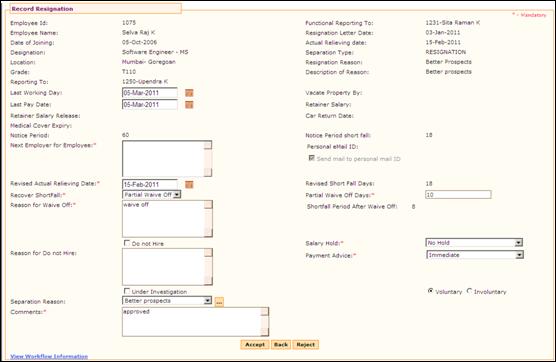
Figure 2‑5 Record Resignation details
The approver can edit the following details while approving the resignation:
· Next Employer
· Revised Actual Relieving Date
· Recover Shortfall option
· Partial Waive-off days
· Reason for Waive-off
· Do not Hire option
· Salary Hold
· Payment Advice
· Under Investigation option
· Voluntary/Involuntary
Enter Comments and click [Accept] to approve the resignation. On approval, mail notification will be sent to the employee at the given personal email id.
Click [Reject] to reject the resignation.
Enter Comments and click [Accept] to approve the resignation.