Reimbursement Types
Why should I use this form?
Use this form to create and classify various reimbursement types.
What are the Pre-requisites?
· Component Type should be available
· Components should be marked as reimbursement in the settings
Who can access this form?
This form shall be visible to all employees to whom the visibility is given in Product Setup ® Module Role Mapping/Module Administration.
How to navigate to this form?
Point to Payroll menu, select Reimbursement Types under Reimbursement.
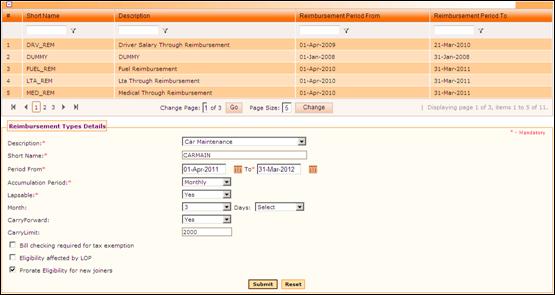
Figure 2‑25 Reimbursement Types Details
The grid in this form shows the list of existing Reimbursement Types. Use the filter section to filter records in the grid based on a condition.
Click the [+] icon on the left top of the grid to show/hide the grid.
The field guidelines are as follows;
Field Name |
Description |
Description |
Select the description from the dropdown list. List of components which are marked as ‘Reimbursement’ in Component Master form is available for selection in this field. |
Short Name |
Enter the short name. The short name will automatically be selected based on the selected component’s short name. |
Period From/To |
Select the from and to date for the reimbursement type to be effective |
Accumulation Period |
This is to select the accumulation frequency of the Reimbursement. Based on this Accumulation period for the given reimbursement, the current month eligibility calculation is done. In case monthly option is selected, the annual eligibility will be divided into 12 months and the eligibility till date accumulation will be done based on the CRS Monthly Credit done for the completed months. Employee will be allowed to claim only to the extent of credited till date. In case Annual Accumulation option selected, the entire annual eligibility of the employee will be allowed to be claimed from the starting. |
Lapsable |
This is to specify whether the claim eligibility will lapse or not. Note: This is applicable only if the Accumulation period is ‘Monthly’. |
Month/Days |
Select month number and number of days when the reimbursement will get lapsed. For example, if monthly credit is done for July month and if the Month – 1 and Days – 15 is selected, then the balance unclaimed amount will lapse by 15th August (45 days). |
Carry forward |
This is to select whether any balance unclaimed amount will be carried forward or not. If this is set as ‘Yes’, then any unclaimed amount up to the limit entered in Carry Limit field will be carried forward. |
Carry Limit |
This is to set ceiling of carry forward amount in case of any unclaimed amount. |
Bill checking required for tax exemption – Selecting this makes the submission of Bills mandatory for the process of Tax exemption.
Eligibility affected by LOP – This will denote that the Reimbursement eligibility will be affected by Loss of Pay.
Prorate Eligibility for new Joiners – Selecting this will Prorate the reimbursement eligibility for the new joiners according to their date of joining.
Click [Submit] to save the details
Click [Reset] to refresh the form.
To modify any record, select the record from the grid. Selected record will be populated in the form. Make necessary changes and click [Submit] to save the changes.