2.10 Attendance Cancellation Approval
Only the approvers who have been configured in the workflow manager will be able to approve the attendance cancellations that are raised by the initiator.
In general, the attendance cancellations are approved by the reporting manager of the employee.
To approve attendance cancellation form,
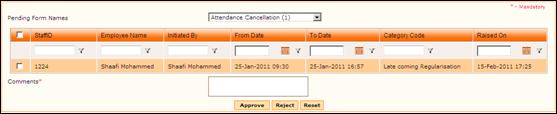
Select ‘Forms Pending for your Approval’ from “Workflow Forms”. Select ‘Attendance Cancellation’ from this list. On selecting the form name, the list of requests that are awaiting approval will be shown as below:
Figure 2‑17 Forms Pending for Approval
Attendance Cancellation can be approved either by directly selecting the checkbox and clicking [Approve] or by viewing details and then approving. To view details of the cancellation request, click a record. The Dynamic Approval form is shown, with selected Attendance Cancellation request.
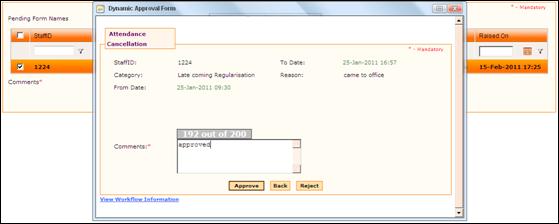
Figure 2‑18 Attendance Cancellation Details
Enter Comments and click [Approve] to approve the cancellation. On approval, it will be sent to next level of approval, if defined.
This will be reflected in Attendance Calendar view of the employee. Now it is possible to raise leave request on that date. If the Regularization Category is selected as 'TOD' then this will be reflected in the weekly Timesheet of the employee for future entry.
Click [Reject] to reject the attendance cancellation.